

The Ultimate AI Music Video Generator for Musicians: Comparing Top Tools In The Market
Before generative AI, the production of music videos required a studio, production team, and extensive editing which led to higher production budget, making it a barrier for independent artists, students and small creators.
However, in 2026, the AI music video generators has enabled users to generate complete music videos with synchronized visuals, sound effects and relevant generative media through a single prompt or audio track in minutes. These AI music video generators operate as music-centric tools which analyzes audio to generate audio reactive and cinematic visuals that matches the rhythm and tempo of the music.
There are several leading platforms like Neural Frames, Plazmapunk, Invideo, and Revid Ai that has become a handy tool for creators because of its features like beat synchronization, automated lyric video, animated backdrops, giving musicians professional results. These music video generators have even proved to be useful for marketers who use them for promo clips and campaigns.
Well, in this guide, I’ve compared the best AI music video generators of 2025 by testing each one with the same audio track, a female vocal disco-inspired piece, to measure sync, customization, and output quality.
But before we actually get into the detailed review, let’s take a quick look at the top platforms that make it possible to make music with AI in this comparison table.
Comparison Table
| Tool | Best for | Export / Resolution | Free plan (key limits) | Starting price* | Ease of use (1–5) |
|---|---|---|---|---|---|
| LyricEdits.ai | Lyric-driven music videos | 1080p / 24 fps now; 4K / 60 fps “coming soon” | Free one-time 150 credits; watermark-free, commercial use; exports credit-gated | $39/mo (Creator) | 4.5 |
| Neural Frames | Audio-reactive visualizers & music videos | Upscaling included; 1080p on lower tiers; up to 4K on higher tiers | Try for free (credit-gated trial) | From $13/mo (Navigator) | 4.0 |
| OpenArt | Prompt-led stylized & cinematic storytelling | Video creation available; no public resolution spec disclosed | Free plan with trial credits | $7/mo (Essential) | 4.0 |
| Dzine.ai | Avatar & lip-sync performances | Native generators to 720p/1080p; separate upscaler to 4K/8K | Free plan (daily/intro credits) | $8.99/mo (Beginner) | 3 (Takes learning to achieve good result) |
| Revid.ai | Template-driven short music videos | Not explicitly stated; platform emphasizes social exports (commonly 1080p) | Free signup / trial, credit-based usage | From $39/mo | 4.6 |
What Is an AI Music-Video Generator?
An AI music video generator is a generative tool or software that uses artificial intelligence to create a music video automatically. These platforms only need users to input audio files (MP3, or WAV), text prompts or lyrics, and the AI can automatically generate visuals that match the theme, rhythm and energy of the music.
Depending on workflow and output style, these AI music video makers now fall into distinct categories.
Types Of AI Music Video Makers
- Audio-Reactive Visualizers: These tools convert musical rhythm and tempo and mood into visual shapes and colors and patterns which create a synchronized audio-visual experience.
- AI Lyric Video Makers: These AI tools extract song lyrics automatically before they match the song rhythm and display animated text on the screen without any manual editing.
- Template & Stock Footage Assemblers: The AI tools generate music video through pre-designed templates and built-in stock media libraries matching it with the emotional tone & rhythm of a song.
- Narrative & Cinematic Generators: These are advanced text-to-video and image-to-video models that create story-driven scenes.
- Avatar-Based Music Video Makers: These tools use digital avatars to lip-sync with the track which creates the illusion of a virtual performer singing the song on screen.
How to Choose the Best AI Music Video Creator?
To choose a good AI Music Video Generator, I evaluated each tool under the metrics below.
- Input Method: Does the tool support audio-to-video, lyric-driven, text-to-video, or template-based generation?
- Music Sync Quality: How precisely does the AI capture tempo, rhythm, and mood?
- Output Quality & Style: Can it deliver crisp resolution like 1080p or 4K? Does it offer different visual moods like cinematic, anime, abstract and render them smoothly without slowing down your workflow?
- Integrations & Export: Does the platform support integration with other important platforms?
- Ease of Use & Learning Curve: Is it beginner-friendly or built for professionals?
- Pricing Model: Freemium plans, subscriptions, or pay-per-download credits all impact long-term value.
- Licensing & Commercial Rights: Does the platform allow commercial distribution without watermarks?
- Safety & Compliance: Clear copyright policies, AI-use transparency, and terms on ownership/attribution are vital for risk-free publishing.
LyricEdits.ai: Best for Lyric-Driven Music Videos
LyricEdits stands as the top choice for users who need to create lyrics video from audio track. Musician, indie artists, & content creators can easily create lyric-based videos instead of a pure beat visualizer in fraction of cost and minimal set up.
Test Clip
Key Features & Differentiators
- Input Methods: LyricEdits.AI supports all file formats like MP3, WAV, FLAC, M4A.
- Music Sync Quality: The platform has a strong lyric-to-audio alignment thus a better user experience.
- Output Quality: The platform provides output of 1080p resolution at 24 frames per second while offering three visual styles which include realistic and 3D and anime.
- Editing Control: User can optimize fonts, colors, spacing, alignment, shadows, and effects and can also swap images and videos by prompting again.
- Integration & Export: Publish ready for TikTok, YouTube, Instagram. Allows exports to DaVinci Resolve, Premiere Pro, Final Cut Pro for advanced workflows.
- Commercial Rights: Users can get full ownership rights with no watermark in paid plan.
Pricing & Licensing
- Free trial: Offers a limited trial credits for testing with non-commercial use and restrictions.
- One-time credits: LyricEdits.ai has an option of one-time credits for users who work on occasional projects without subscribing.
- Subscriptions: Paid plans start at around $39/month and scale up to $149/month.
- Commercial rights: Users get access to full commercial use and watermark-free output.
My Experience
LyricEdits.ai is undoubtedly the best tool if you want an easy to use and effective lyrics video generator. All I had to do is upload the track and the tool transcribed the lyrics and generated visuals that synced with the audio and matched the song’s theme.
Besides, the software also allows you an option to pick static or moving visuals per section in the video to control credits. The customization is limited but enough for making lyrics video as it allows control of fonts, spacing, alignment, colors, and effects. Compared to manual editing, this AI-powered tool saved hours while still providing studio-quality output. For musicians wanting to create lyric videos quickly, LyricEdits.ai is the best option, better than most competitors.
Neural Frames: Best AI Music Video Generator For Audio-Reactive & Music Visualizers
Neural Frames is the best AI Music Video Generator for professional audio-reactive music visualization. It is best for musicians and content creators who want deep instrumental synchronization and stem-based visual control. Unlike Veed’s template-driven approach or Onemaker’s basic beat-matching, Neural Frames deliver true audio-reactivity through automatic stem separation.

Step 1: Upload The Preferred Music
Step 2, Click on Create Video
Step 4: Select The Model & Generate
Step 3: Select Video Type You Want To Generate
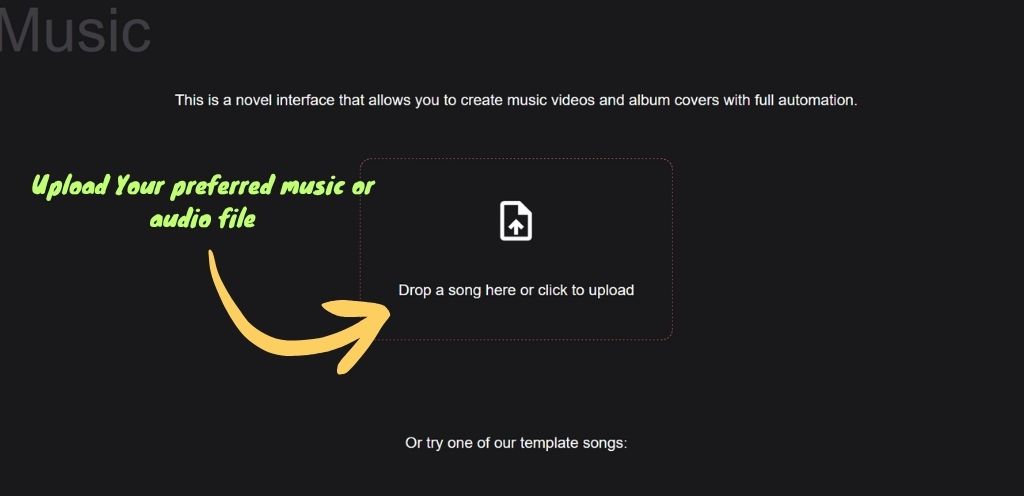
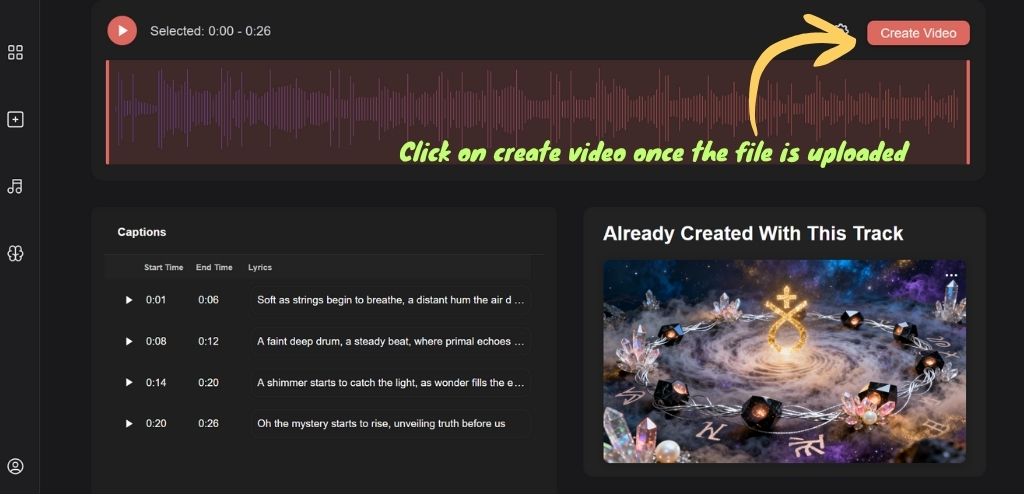
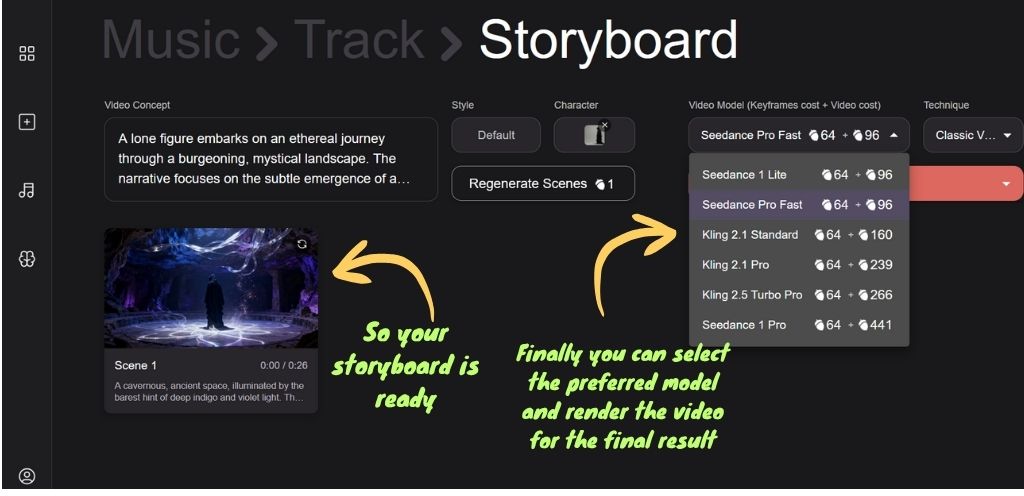
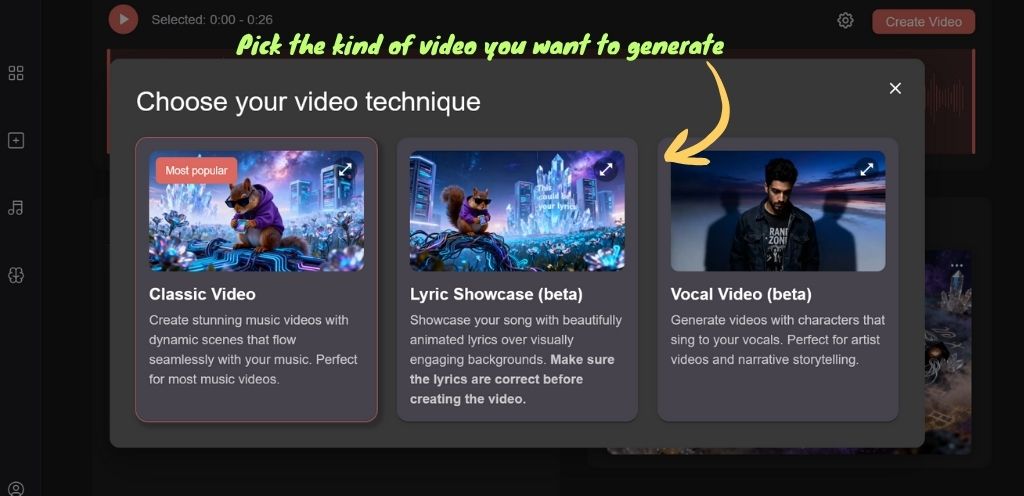
Key Features & Differentiators Of Neural Frames
- Stem-based reactivity: The engine auto-separates up to 8 stems like vocals, drums, bass, etc. and lets you map visual parameters like zoom, rotation, style strength to each stem’s amplitude for true beat/instrument sync.
- DAW-style timeline: The platform provides a DAW-style timeline editor that lets user to add frame‑accurate prompts, camera moves and modulation.
- Autopilot storyboard: It has a one-click mode that analyzes lyrics and mood and automatically creates a storyboarded clip that user can tweak.
- Custom AI models: User can create their custom avatar simply by uploading reference images and videos.
- Resolution & formats: Neural Frames provides 1080p/4K outputs and multiple aspect ratios (16:9, 9:16) which is suitable for YouTube, Reels, Shorts, and Spotify Canvas.
Pricing & License
- Free trial: 20-second watermarked video generation.
- Neural Navigator: $19/month with basic features and exports.
- Neural Ninja: $99/month with unlimited 4K generation.
- Credit rollover included for active subscribers.
- Full commercial rights granted on paid subscriptions.
- User audio licensing responsibility required for copyrighted content.
My Experience Using Neural Frames
Neural Frames is undoubtedly the best AI music video generation platform, but I did find its DAW-style timeline editor slightly difficult to operate because of which my early output came out glitchy. However, the result came out smooth after I adjusted the stems, bass driving zoom, camera moves, & other customizations.
Talking of the accuracy, Neural Frames provides the best audio-reactive precision compared to most of its competitors. However, rendering can take up to 8 to 10 minutes even for a short clip which can be frustrating sometimes. Having said that, its excellent output and extensive customization option makes it stand out as a professional tool for audio-reactive music visualizer.
OpenArt: Best for Prompt Led Stylized & Cinematic Storytelling
Among numerous competitors, OpenArt stands as the best AI music video maker tool for musicians and storytellers who want stylized, cinematic, and narrative-driven music videos. This ai powered tool provides both automation and manual control for creating cinematic content that match the music and lyrics you provide.
Test Clip
Key Features & Differentiators
- Multi-Model Access: The tool offers over 100 image models and 12+ video models which also include Kling 2.1, Veo 3, Flux in one platform.
- One-Click Story: It can effectively generate full narrative videos with cinematic scenes, and syncing just from an audio song or lyrics.
- Consistent Characters: Provides strong character consistency across scenes.
- Cinematic Options: The platform has several style options like photorealistic, anime, abstract and blues, to get the desired results for the users. It also has upscaling features to 8K / 120 FPS via Topaz integration.
- Lip-Sync Mode: Animates avatars to match vocals with convincing realism.
- Flexible Inputs: It has audio-to-video, prompt-to-video, and image-to-video input options.
Pricing
- Free trial: 40 credits for 7-day period with premium access
- Essential plan: $7/month (annual) with 4,000 credits and 4 stories
- Infinite tier: $28/month (annual) with 24,000 credits and 24 stories
- Commercial rights granted for all generated content
- Watermark-free exports included on paid subscriptions
My Experience Using OpenArt
For cinematic and stylized storytelling, OpenArt has been the most capable AI music video generator I’ve tested. The platform is specifically designed to create cinematic visuals integrated with preferred music unlike Kaiber and Runway which is mostly for cinematic and storytelling video generation. Well, I created two videos with the same track, one being narrative cinematic, the other one was abstract, and both the results were exceptional. In fact, a lot of scenes were hard to tell were AI generated.
Moreover, the OpenArt AI was also able to generate consistent characters, natural motion and accurate lip-sync. That said, I noticed small flaws where in one scene I noticed a mis-timed and rapid finger tapping against the beat. Likewise, the tool had a hard time depicting shadows especially in one scene where a car passes the streetlight. However, these glitches were easy to fix in the editor. Overall, OpenArt is an excellent choice for musicians who want professional-looking music videos without heavy manual production and expenditure.
Dzine.ai: Best AI Music Video Generator for Avatar & Lip-Sync Performances
Dzine.ai is one of the best AI music video makers if you specifically want an avatar-driven music video with accurate and natural lip sync. This tool can conveniently deliver natural singer-style videos where avatars move, emote, and perform in sync with the track.
Test Clip
Key Features & Differentiators of Dzine AI
- Input Methods: It has audio-to-video, image-to-video, text-to-speech, and 3D avatar creation from text prompts or selfies.
- Lip-Sync Quality: Dzine is very good at synchronizing vocals to mouth movements and even offers multi-character support. Goes beyond basic lip animation by capturing facial expressions and subtle gestures that align with music and lyrics.
- Avatar Control: Includes tools like Face Repair, Expression Edit, and Face Swap, plus options to change attire, background, and even add instruments for performance videos.
- Output Quality: Provides High-resolution output with exports up to 6144×6144px. Also supports photorealistic, anime, and cartoon styles.
- Exports: MP4 for videos, PNG/JPG for images. Paid plans remove watermarks and allow easy sharing on TikTok, YouTube, and Instagram.
Pricing
- Free Plan: Allows Limited features with 30-32 daily credits with watermarks.
- Beginner ($8.99/mo): ~900 credits, 2× resolution.
- Creator ($19.99/mo): ~3,000 credits, 4× resolution.
- Master ($59.99/mo): Unlimited queue, advanced features.
Note: Paid tiers unlock full commercial rights. Users have the ownership but are responsible for the audio rights.
My Experience Using Dzine AI
Dzine.ai, in my view, is one of the best AI music video generators for lip-sync content. Once I finalized the character I wanted to lipsync, I could fully customize its attire, expressions, and backgrounds. Users can also make characters carry and play musical instruments in scenes with the help of Dzine’s advanced AI feature. Likewise, the tool is also good at imitating natural body language and facial expression that matched both beat and lyrics, unlike most platforms that only animate mouths.
The only thing that I was disappointed with was the user interface and functionality. It required multiple uploads to complete minor tasks and workflow felt less streamlined than expected. Having said that, I really loved the end result and the overall quality of the output.
Revid.ai: Best for Creating Template-Driven Music Videos
Revid.ai is the best tool if you want a template based music video generator. It is perfect for indie musicians, social media creators, and marketers who need professional-looking music videos without spending a lot and in less time.
Test Clip
Key Features & Differentiators
- Multi-Input Support: Supports numerous audio inputs (MP3, WAV), Spotify links, or imported tracks from Suno AI.
- Preset Styles: Provides multiple style options like cinematic, upbeat, minimalist, abstract, and lyric-focused templates for fast deployment.
- Music Sync Modes: Accurate beat-syncing and lyric-syncing along with waveform graphics features for electronic and meme tracks.
- Content Repurposing: You can even convert YouTube links, X posts, or LinkedIn articles into videos.
- Output & Formats: 1080p at 30/60 FPS, aspect ratios (9:16, 1:1, 16:9). MP4/MOV/AVI exports.
- Workflow Speed: Relatively faster rendering with most clips being rendered in under 2 minutes.
Pricing
- Trial/Free Tools: Offers limited free trial but the files cannot be exported in free tier.
- Paid Plans: Around $32 per month if you pay annually otherwise $39/month for Hobby or Growth tiers (as of November 2025). Ultra at $199 per month. Has a credit-based system where actions consume credits.
- Commercial Rights: Paid plans grant watermark-free exports and full commercial ownership.
My Experience Using Revid AI
Revid.ai steals the show for template based ai music video generators despite its massive competitors like Invideo and freebeat. One of the things that stand out for Revid is its simplistic interface. All you have to do is Upload a track and apply a cinematic preset to generate a ready-to-post vertical video in minutes. The lyric sync worked well, though the creative control was limited. Still, for fast, template-driven output, it’s one of the most efficient tools I’ve tested.
Limitations of AI Music Video Generators
Most AI music video generator as we mentioned above are designed for specific kind of output which acts a limitation for the one who want broader creative control, structured or specific scene alignment, or a proper postproduction refinement. Here are some of the major limitations of these tools.
Limited Support for Structured Storytelling and Scripted Video Generation
Though the AI powered music video tool can generate cinematic scenes, they are not designed for script led storytelling and mostly lack scene progression and continuity. These tools focus on rhythm and visual abstraction instead of a narrative story, unlike other broader AI video generation tools that are more suitable for scene-to-scene video synthesis providing desired results.
Minimal Post-Production Control and Editing Capability
Almost all the AI tools that are specifically for music generation lack post products controls like precise cuts, transition, stabilization or visual correction after the initial render. As a result, creators often need a separate AI tool for video editing to refine the generated footage.
